

NanoDrop Spectrophotometer
The Thermo Scientific NanoDrop OneC Spectrophotometer is a stand-alone, compact UV-visible spectrophotometer designed for quick measurement of highly concentrated samples across diverse analytes, eliminating the need for dilution. The NanoDrop is designed to help research scientists achieve success in downstream applications by accurately quantifying DNA, RNA, and protein samples using only 1–2 µL. Its glove-friendly touchscreen facilitates easy access through pre-installed software applications, allowing for rapid assessments of purity and concentration within seconds. The built-in Acclaro Sample Intelligence technology detects and corrects for contaminants, enhancing decision-making about sample quality and boosting outcomes in subsequent procedures.
Safety Considerations
Tips for Success
- Preparation — Regularly calibrate the NanoDrop to ensure accuracy and allow the instrument to warm up if it hasn’t been used for a while.
- Sample Handling — Ensure samples are free of contaminants and dilute samples to fall within the measurable range.
- Sample Application
- Correct Volume: Apply the exact volume specified (usually 1–2 µL).
- Clean Pedestal: Clean the sample pedestal before and after each use.
- Consistency: Apply samples consistently to avoid bubbles.
- Measurement Technique
- Blanking: Always blank the instrument with the same buffer or solvent.
- Replicates: Measure each sample multiple times and use the average.
- Data Integrity: Record data immediately and label samples correctly.
- Maintenance
- Regular Cleaning: Clean the instrument surfaces regularly.
- Proper Storage: Cover the NanoDrop when not in use.
- Service: Schedule regular maintenance checks.
- Software & Data Management — Keep the software updated.
Parts of the NanoDrop Spectrophotometer
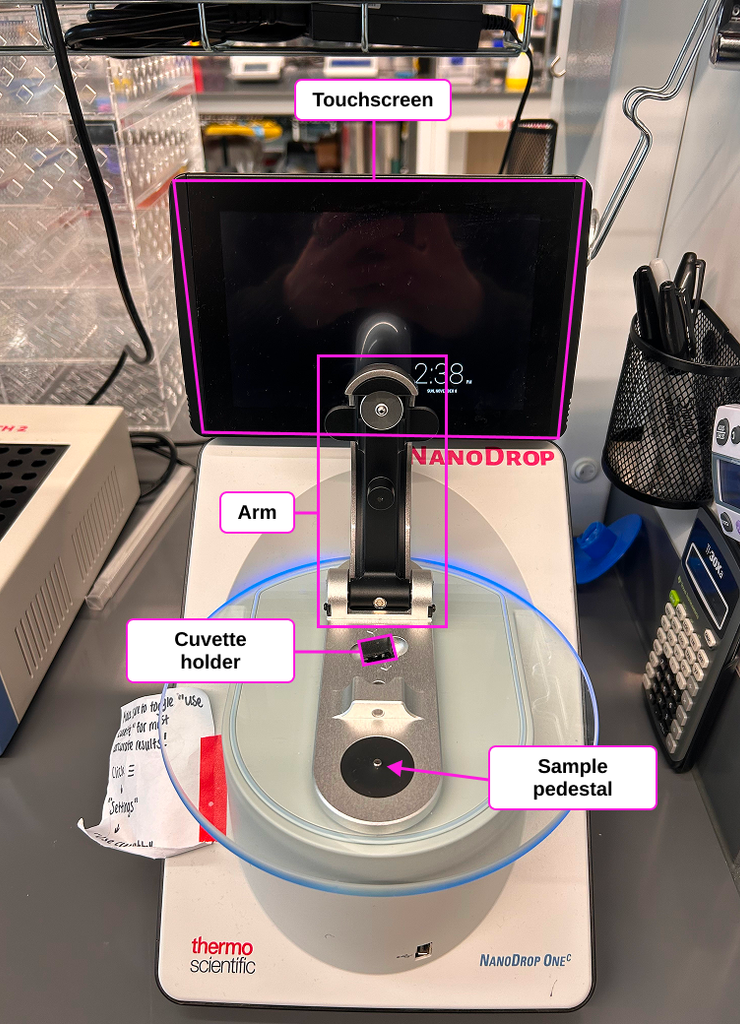
How to Use the NanoDrop UV/Vis Spectrophotometer
Using the NanoDrop One/OneC spectrophotometer involves several straightforward steps to accurately quantify and qualify DNA, RNA, and proteins using very small sample volumes. Here’s a step-by-step guide:
1. Setting Up the NanoDrop Spectrophotometer
- Power On: Connect the NanoDrop spectrophotometer to a power source and turn it on. The NanoDrop One/OneC has a built-in touchscreen interface for easy operation.
- Initialization: Wait for the instrument to initialize. This usually involves a brief self-check and calibration.
2. Performing a Measurement
- Select Application: On the touchscreen, choose the appropriate application based on your sample type (e.g., nucleic acids, proteins). The NanoDrop One/OneC supports a variety of measurements including A260 for nucleic acids, A280 for proteins, and more.
- Blank Measurement: Pipet 1–2 µL of your blank solution (e.g., water or buffer) onto the measurement pedestal, lower the arm, and select the “Blank” function. This calibrates the instrument and sets a baseline.
- Sample Measurement: Pipet 1–2 µL of your sample onto the measurement pedestal, lower the arm, and select the “Measure” function. The NanoDrop will take a measurement within seconds and display the results.
3. Interpreting Results
- Purity Ratios: The NanoDrop provides purity ratios (A260/A280, A260/A230) to help assess sample quality. Pure DNA typically has an A260/A280 ratio of ~1.8, and pure RNA has a ratio of ~2.0. Deviations can indicate contamination (e.g., protein contamination can lower these ratios).
- Concentration: The concentration of your sample is displayed based on the absorbance measurement and the known extinction coefficient of the analyte.
4. Advanced Features
- Acclaro Sample Intelligence: Identifies and corrects for contaminants using full-spectrum analysis and chemometric algorithms, ensuring accurate concentration measurements even in the presence of contaminants.
- Data Management: Data can be exported and shared via USB, Ethernet, or Wi-Fi. The NanoDrop One/OneC also supports cloud storage through the Thermo Fisher Connect platform, allowing remote access and collaboration.
5. Maintenance
- Cleaning: After measurements, clean the pedestal with a lint-free lab wipe and a small amount of water or an appropriate cleaning solution to prevent cross-contamination.
- Software Updates: Regularly update the NanoDrop software to ensure optimal performance and access to the latest features.
By following these steps, you can efficiently use the NanoDrop Micro-UV/Vis Spectrophotometer to obtain reliable and accurate measurements for your DNA, RNA, and protein samples. For more detailed information, refer to the user guide and resources provided by Thermo Fisher Scientific.
Additional Information
User Guide: