

What is an Infrared Sterilizer?
An infrared sterilizer is a device that uses infrared heat to rapidly sterilize instruments. It is widely used in laboratory environments, biosafety cabinets, purification workbenches, and mobile carts. The sterilization process is flameless, achieving high temperatures within seconds.
Where are the Infrared Sterilizers?
In the Wet Lab Makerspace, infrared sterilizers are on many benches, throughout the lab.
Parts of the Infrared Sterilizer
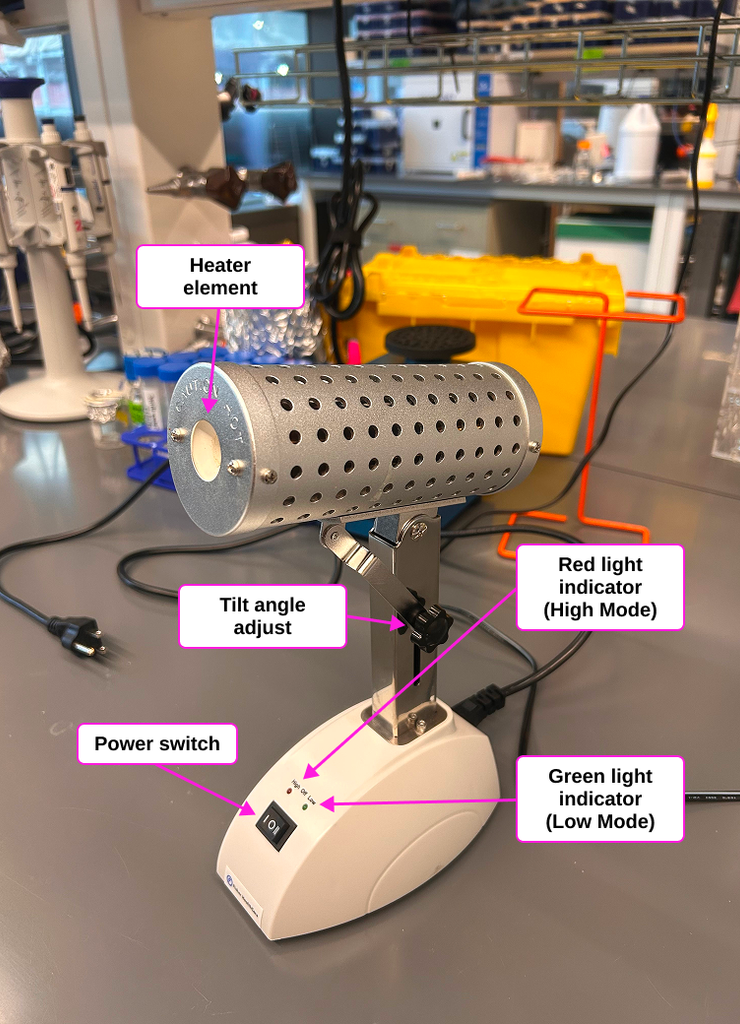
- Heater Element: place to put elements that need to be sterilized.
- Power Switch: “High”, “Low”, and “Off” settings
- Tilt Angle Adjust: Adjust the Heater Element into desired position.
- Red Light Indicator (High): This is the high position of Infrared sterilizer. When the Infrared Sterilizer is switched on and turned into red indicator, it will heat up to 815 °C. (The instrument should be left in this setting for no longer than 3 hours)
- Green Light Indicator (Low): This is the low position of Infrared sterilizer. When the Infrared Sterilizer is switched on and turned into a green indicator, it will heat up to 500 °C.
Safety Information
- This instrument gets HOT! Do not touch the interior or exterior of the heating element!
- Sterilized items will also be hot! Allow your sterilized instruments to cool before use and hold them with an insulated gloves, if necessary.
Do NOT touch the heating element!!
Tips for Success
- Keep loop inside the heater elements for minimum of 5 seconds which microorganisms generally destroyed within 5 seconds.
Operating Instruction
1. Turn on instrument
Ensure that the Infrared Sterilizer is placed on a stable and level surface, and plugged in.
Switch “Power Switch” into “High” position, red light should turn on.
2. Wait
Wait 30 mins to let Infrared Sterilizer to heat up to desired temperature.
3. Sterilize
Gently insert the item that need to be sterilized into the cylindrical sterilization area. Avoid scraping the sides which might affect the longevity of your loop and heater element. Let loop stay for 5 seconds. Avoid leaving infrared Sterilizer in high position for more than 3 hours. Please switch to low position for 30 mins then switch back.
4. Cool
Your sterilized instrument will be hot! Stand it up in a rack to cool before use.
5. Standby, if necessary
Do not leave the instrument on the “High” setting for more than 3 continuous hours.
If you must work with this instrument for more than 3 hrs, place in “Low” mode while not in use.
6. Shut Down and Clean Up
Switch the Power Switch to the “Off” position. The green and red lights should both be off.
Additional Information
Operation Manual: B1000-BactiZapper-Manual.pdfDownload B1000-BactiZapper-Manual.pdf
Youtube Video: https://www.youtube.com/watch?v=G6c3aP_iJ-4Links to an external site.